
How to Preview PDF File
Preview PDF File
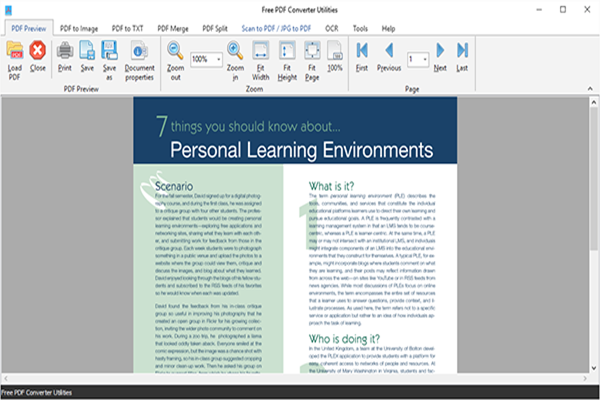
Launch Free PDF Converter Utilities and click “PDF Preview” tab. Click “Load PDF” to choose a PDF file you want to view and click “Open” to input it to the program window. Then, preview the file with specific tools.
(1) Load PDF – click this button to add a PDF file to the program window
(2) Print – print out the current file with the printer connected with your computer
(3) Document properties – add information to the PDF file, check its security, fonts, set layout preference, etc.
(4) Zoom
Zoom in/out – increase/decrease rapidly the magnification of the image
Fit Width – fit the page within the left and right sides of the viewer window
Fit Height – display the page to fit between the top and bottom of the viewer window
Fit Page – make the entire PDF pages to appear in the pane
(5) Page
First/Last – switch to the first/last page of the PDF file
Previous/Next – go to the previous page/next page
Free Download
Download Free PDF Converter Utilities for Free! To install and use of Free PDF Converter Utilities will be no harder than downloading it – anyone can achieve their goals without painful learning. 100% free and no strings attached, guaranteed. Start your happy experience with a single click here!